


AI English – Learn & Speak
0.00.00 Reviews
App Specs
- Version
- 15
- Updated On
- License
- Free
- Downloads
- 500,000+
- Developer
- EZPub
- Categories
- Education
- Platform
- Android
Screenshots
 Analysis by AppCompare
When I try an English-learning app for the first time, I want to know what I can do with it right away—not just what it promises. AI English – Learn & Speak is an education app from EZPub, aimed at people who want to build English skills with AI-guided practice. It is free to install, has reached over 500,000 installs, and is rated for Everyone. Its average rating is currently 0.0, so I wouldn’t use ratings as a shortcut for deciding whether it suits me; I’d focus instead on whether its learning approach matches the kind of practice I need.
What to expect from your first session
The main appeal is the idea of practising English through a combination of guided learning and speaking exercises. That can be a useful change from studying vocabulary lists alone: remembering a word is one thing, but finding it quickly while speaking is another. The app’s current version is 15, and it requires Android 8.0 or later. I’d check those basics before installing, especially if I’m setting it up on an older phone.
I’d go in with a practical goal rather than expecting an app to make me fluent by itself. For example, I might want to get more comfortable introducing myself, asking for help, or speaking up in a familiar work situation. A focused target makes it easier to judge whether a lesson is useful and to keep practice from turning into aimless tapping.
Getting set up without overthinking it
On opening the app, I’d take a moment to work out how its learning flow is organized before starting several activities at once. If it offers a choice of level or learning goals, I’d answer honestly rather than selecting an advanced option to test myself. A good starting point should feel manageable while still making me retrieve words I don’t use every day.
I’d also choose a quiet moment for the first speaking exercise. Voice practice can feel awkward when other people are nearby, and background noise may make it harder to concentrate on what I’m saying. That doesn’t mean I need a formal study setup: a short session at home or during a quiet break is enough to learn how the app expects me to respond.
Finding a first useful win
For a first session, I’d pick one everyday situation and treat it as a small rehearsal rather than a test. If I’m preparing to order food in English, for instance, I can focus on saying a simple request clearly, then repeat the parts that feel uncomfortable. The useful outcome isn’t a perfect accent; it’s getting through a phrase without freezing and noticing which words need more practice.
My best tip is to repeat a speaking prompt after checking the feedback, instead of moving on as soon as the app responds. On the first attempt, I’m often busy remembering the sentence. On the second, I can pay more attention to pronunciation and rhythm. This small change turns feedback into practice rather than a score to glance at and forget.
Worth Reading Before You Choose

EA SPORTS FC Mobile 26 Is a Bigger Football Game, but It Takes Time

Flipboard Shows What News Apps Must Do Beyond the Feed

Switching to Android Auto Means Rethinking Your Driving Routine

Google Calendar Makes a Crowded Week Easier to Manage

Ludo King Makes the Most of the Minutes Between Plans

Baby Panda World Brings Quick Play to Modern Phones, but Its Game Library Feels Busy
Where it fits among English-learning options
Compared with a dictionary or a flashcard tool, an AI-focused learning app is more useful when I want to practise producing English, not only recognizing it. Compared with a live tutor or a conversation group, it offers a more private way to rehearse without having to arrange a meeting or worry about slowing another person down. Those options still have an advantage when I need nuanced correction, natural back-and-forth, or a human explanation of why a phrase sounds unusual.
That distinction matters when choosing what to use. If my biggest problem is forgetting vocabulary, a dedicated review routine may be a better fit. If I can understand English but hesitate when speaking, guided voice practice is more directly relevant. I’d treat this app as one part of a learning routine, not a replacement for reading, listening to varied speakers, or real conversations.
First Impressions: What’s the Buzz?
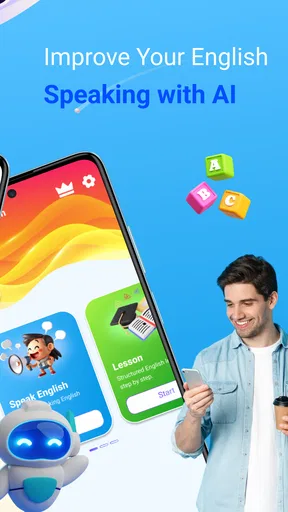
When you first open AI English – Learn & Speak, it's like stepping into a sleek, modern classroom. The interface is clean, intuitive, and doesn’t overwhelm you with options, which is a relief when you're just starting out on your language-learning journey. The app promises to blend AI technology with language learning, aiming to make the process not only effective but also engaging. So, does it deliver?
The Learning Experience
One of the coolest features is how the app uses AI to personalize your learning path. You start with a quick assessment, and from there, it tailors lessons to fit your level and goals. Whether you're a complete beginner or brushing up on your skills, the app adapts, which is pretty neat.
The lessons themselves are bite-sized, making them perfect for squeezing into a busy schedule. You can easily tackle a lesson during your morning commute or while waiting in line for coffee. They cover a range of topics: vocabulary, grammar, pronunciation—you name it. I found the balance between reading, listening, and speaking exercises to be spot on.
To make those short sessions count, I’d avoid switching between several goals in one sitting. If I’m practising pronunciation, I’ll stay with the speaking activity long enough to notice a pattern; if I’m reviewing grammar, I’ll focus on using one structure in a few examples. That gives me a clearer sense of what I can do independently, rather than simply how quickly I can finish a sequence.
Engaging Content and Features
What sets this app apart is its interactive voice recognition feature. It’s like having a patient language buddy who doesn’t mind your awkward pronunciation attempts. The immediate feedback is invaluable, and it helps you refine your speaking skills in real-time.
Plus, the app incorporates real-world scenarios, so you’re not just learning random phrases. You practice conversations you might actually have, which is a huge confidence booster. It’s like prepping for a trip abroad without leaving your living room.
- Customizable learning paths
- Interactive voice recognition
- Real-world conversational practice
A useful way to approach voice recognition is to separate a pronunciation problem from a recognition problem. If a response isn’t accepted, I’d try speaking the phrase again at a steady pace before assuming I need to change the wording. A quiet setting and clear delivery can make practice less frustrating, while repeating the same phrase gives me a fairer comparison between attempts.
At the same time, automated feedback has limits. It can help me practise saying a phrase, but I wouldn’t treat every result as a complete judgement of how natural or appropriate I sound in a real conversation. When the goal is to learn tone, cultural context, or how to respond to an unexpected question, a human conversation remains a valuable complement.
Community and Support
Another highlight is the community aspect of the app. You can connect with other learners, share progress, and even challenge each other with friendly competitions. It adds a social layer to learning, keeping you motivated and engaged.
If you ever hit a snag, the app offers robust support through FAQs and a responsive help team. Having that safety net is reassuring, especially when you’re navigating new tech.
For a first-time learner, community features are most helpful when they support a routine rather than become the routine. I’d use shared progress or a friendly challenge as a nudge to return to practice, then spend most of my study time actually working on English. If social comparison makes me anxious, I can keep my goal personal: repeat a lesson, practise a tricky sentence, or finish a short session on a busy day.
Is It Worth It?
Now, let’s talk about the elephant in the room: the price tag. While the basic features are free, there's a premium version that unlocks additional content and features. If you’re serious about learning English and want to fast-track your progress, the investment might be worth it. But if you’re just dabbling, the free version still offers plenty to keep you busy.
The app is free to download, with in-app purchases ranging from $3.99 to $13.99 per item. I’d start by using the free experience long enough to see whether I enjoy its lesson style and return to it consistently. Before paying for anything, I’d check what that particular purchase unlocks and whether it addresses a need I actually have. A paid option is easier to assess when I can name the feature I’m missing, rather than buying on the vague hope of faster progress.
This is a better fit for learners who want low-pressure speaking practice, bite-sized study, and a guided path they can work into spare moments. It may be less suitable if I need a structured course with a clear syllabus for an exam, detailed explanations from a teacher, or regular conversation with fluent speakers. In those cases, I’d pair an app with a course, tutor, or language exchange, or choose one of those options as the main method.
For a realistic everyday routine, I’d use a few minutes before work to review one lesson, then return later in a quiet place to say a phrase aloud and repeat it after the feedback. If I’m preparing for a trip, I could focus that practice on common travel exchanges; if I’m learning for work, I could rehearse a simple introduction. Keeping the goal tied to something I’ll actually say makes the exercises easier to remember when I need them.
In the grand scheme of language apps, AI English – Learn & Speak stands out for its innovative use of AI and user-friendly design. It's like having a personal language tutor in your pocket, ready to help you learn and speak English with confidence.
So, should you download it? If you're looking for a flexible, personalized way to learn English, give it a shot. You might just find it’s the tool you’ve been waiting for to finally master the language.
My more measured recommendation is to try it if speaking practice is the gap you want to address, then judge it by whether you feel more ready to use a phrase after practising—not by how many screens you complete. If you prefer learning through explanations, books, or live conversation, those methods may suit you better, and there’s no reason to force an app-based routine that doesn’t feel natural.
For a first meaningful success, I’d set one small target, complete a relevant exercise, and repeat one spoken response until it feels easier to say. That gives me a concrete reason to come back the next day. Used that way, the app can be a practical starting point for building confidence, while steady progress still depends on practice beyond any single tool.
Pros
- Interactive lessons enhance learning.
- Variety of exercises keeps engagement high.
- AI feedback is timely and constructive.
- User-friendly interface for easy navigation.
- Offline mode available for flexibility.
Cons
- Limited language options beyond English.
- Requires subscription for full features.
- Occasional AI misinterpretations.
- Some features need constant internet.
- Ads can be intrusive without premium.
FAQs for AI English – Learn & Speak
What features does AI English – Learn & Speak offer to enhance language learning?
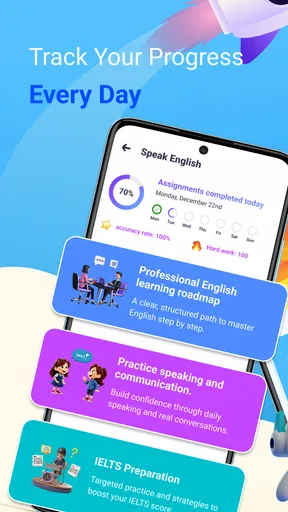
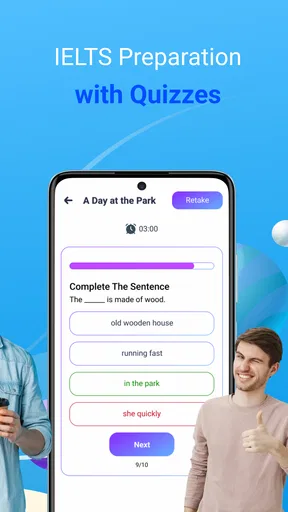
AI English – Learn & Speak uses advanced AI technology to provide personalized language lessons, interactive speaking exercises, and real-time feedback. It includes a variety of modules such as vocabulary building, grammar lessons, and pronunciation practice. Additionally, the app offers daily challenges and quizzes to reinforce learning and track progress.
Is AI English – Learn & Speak suitable for beginners and advanced learners?
Yes, AI English – Learn & Speak caters to all proficiency levels, from beginners to advanced learners. The app adapts to your skill level, ensuring that content is neither too easy nor too challenging. It offers tailored lessons and exercises that evolve as your proficiency improves, making it a versatile tool for anyone looking to improve their English skills.
Does AI English – Learn & Speak require an internet connection to function?
While an internet connection is required for initial setup and downloading lessons, AI English – Learn & Speak offers offline mode. Once the necessary content is downloaded, users can access most features without an internet connection, making it convenient for learning on the go or in areas with limited connectivity.
How does AI English – Learn & Speak ensure effective pronunciation practice?
The app uses state-of-the-art speech recognition technology to provide real-time feedback on pronunciation. Users can listen to native speakers, practice speaking, and receive immediate corrections and suggestions. This feature helps users identify areas for improvement and develop a more natural and fluent speaking style.
Is there a cost to use AI English – Learn & Speak?
AI English – Learn & Speak offers a free version with basic features, but to access premium content such as advanced lessons, personalized learning plans, and ad-free experience, users need to subscribe to a paid plan. The subscription fees are competitive, and there's often a free trial for new users to explore premium features.


